

Desktop wallet for ICON
ICONex starts here.
ICONex is built around the moments that matter on ICON — sending, staking, voting, approving — with one calm reading flow instead of a pile of disconnected wallet states.
windows · macOS · linux
ICON Foundation release channel
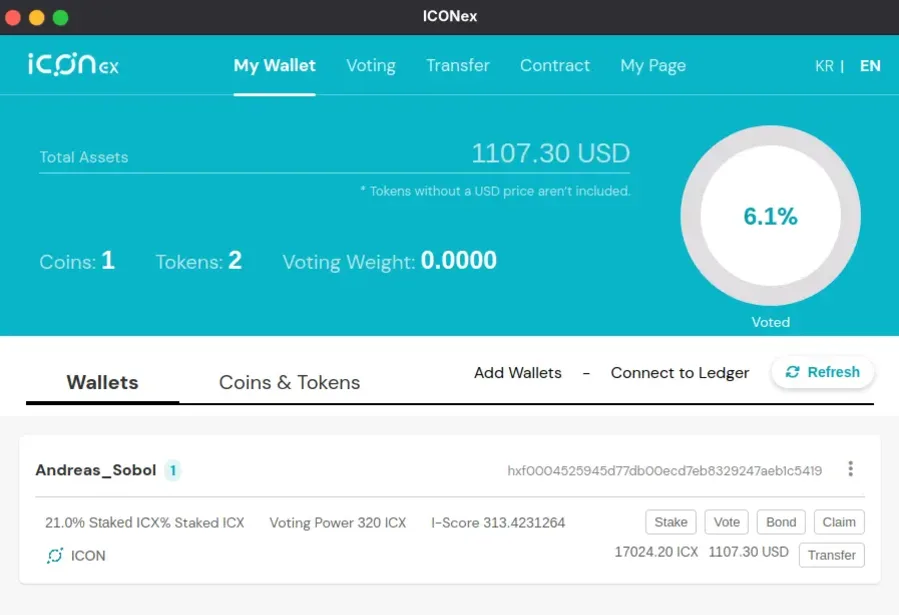
Main surface

Stake, send, vote, claim, and restake stay in one view so you never hunt for context.
Routine recovery

Backups feel like maintenance, not crisis mode, so moving or restoring never feels risky.
Readable intent

Transactions explain who, what, where, and cost in one scan so you know what you’re approving.
Three check-ins before and after you click
ICONex keeps your mental model intact by surfacing what matters at each moment: where your keys live, what you’re about to approve, and what just landed on chain.
Setup
Keys stay close
Wallet creation and backups stay local to your machine, with reminders that push offline storage before you need recovery.
- Local-only keys, with a straight export path when you need to move.
- Recovery prompts appear early, before they become post-loss regret.
- Separate profiles keep personal and work wallets from bleeding together.
Signing
Approvals you can read
Contracts are rewritten into intent-first sentences: who you’re paying, on which network, for what amount, and with what fee exposure — approve the human sentence instead of raw data while fees stay visible.
- Transactions read like short sentences, not raw payloads.
- Fee, token, and counterpart live in one visible decision zone.
- Riskier actions slow down slightly; routine transfers stay light.
After
History that tells the story
Once an action lands, the receipt mirrors what you confirmed — with hashes when you want them — so you can retrace what happened without reconstructing it from raw logs.
- Activity groups around intent instead of feeling like a raw log dump.
- Exports preserve context, not just bare chain identifiers.
- Recent actions stay near the main surface where follow-up usually happens.
Desktop app
One desktop wallet across every platform — the same ICONex flow for signing, staking, and receipts, packaged in the format that feels native to your OS.


Common questions
Quick answers on setup, restore, security, signing, and everyday use.
Overview
ICONex is a desktop wallet built for the ICON ecosystem.
It keeps your keys on your own device and lets you approve transfers, staking actions, and contract interactions from one readable desktop flow.
Getting started
No sign-up is required.
You can create or restore a wallet directly in the app. There is no separate user account layer — your wallet address is the identity you use on-chain.
Restore
Install ICONex and restore with your recovery phrase.
On the new machine, choose the restore flow, enter the phrase you saved offline, and confirm that the restored wallet address matches the one from your previous device before making new transactions.
Verification
The hash check confirms you downloaded the right file.
Comparing the SHA-256 value of your installer with the published release hash helps verify integrity before first launch and reduces the chance of installing a modified or incomplete build.
Troubleshooting
Check status first, then check fee balance.
Look up the transaction hash in an explorer to see whether it is pending, confirmed, or failed. If it did not land, make sure the wallet still holds enough balance to cover network fees before retrying.
Security
No — ICONex cannot view or recover your keys for you.
Your keys stay encrypted on your own machine. That is also why the recovery phrase matters so much: losing it means losing the normal path back into the wallet.
Staking
Yes, ICONex is designed for routine ICON actions.
That includes common flows such as staking, voting, claiming, and reviewing transaction intent in a desktop environment where context stays visible instead of being buried in separate screens.
Best practice
Start with a small test transaction.
Before sending a larger amount, verify the destination address carefully, send a small test first, and make sure you understand the network fee and final destination before confirming the full transfer.
Community
Build with people who ship on ICON
Feedback, release notes, and feature experiments happen where the community already hangs out. Join in and influence what ships next.